Troubleshoot · account
Tiranga game login problems, password reset and account security
Direct answer
Forgot your password? Tap Forgot password? on the login screen, enter your registered number with +91, and reset it with the SMS OTP. If no OTP arrives or the number is no longer yours, only in-app support can help, and nobody on Telegram or WhatsApp can.
Most Tiranga login failures come from one of four causes: a wrong or clone website, a mismatched phone number format, a password that was changed (sometimes by someone else), or a platform-side block. This page helps you work out which one, and what to do about it. We can’t access or reset any account; only the platform can.
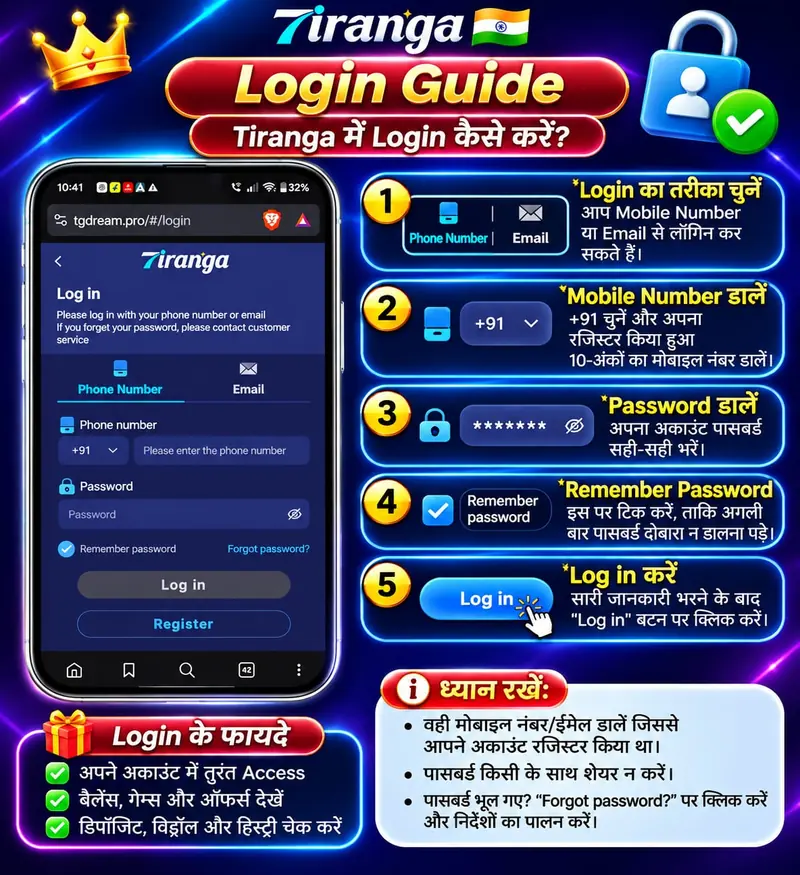
Error messages and what they usually mean
| You see | Likely cause | What to try |
|---|---|---|
| “Account or password error” | Typo, wrong country code, or password changed | Check that +91 is selected and you entered 10 digits with no leading 0. Then use Forgot password. |
| “Mobile number already registered” | You (or someone using your number) registered before, possibly on a clone | Use Forgot password rather than registering again. Multiple accounts can get all of them frozen. |
| OTP not arriving | DND filters, network delay, or SMS gateway down | Wait a few minutes, check SMS spam/promotions, don’t request repeatedly (it can lock you out). |
| “Account frozen / restricted” | Platform flagged “abnormal betting”, multiple accounts or a payment issue | Contact in-app support with your user ID only. Never pay an “unfreeze” fee. |
| Page won’t load at all | Domain blocked, changed, or down | See website not working. |
| Logged in, but balance or history is wrong | You may be on a look-alike site | Log out, check the address, and change your password from a trusted device. |
How password reset works
- On the login screen, tap Forgot password?
- Enter the same phone number or email you registered with.
- Enter the OTP sent to that number. It comes from the platform’s SMS sender, never from a person.
- Set a new password that you don’t use anywhere else.
If you no longer have access to the registered number, only the platform’s in-app support can help. Anyone on Telegram or WhatsApp offering to “recover” your account is trying to take it, or to take a fee from you.
Account security checklist
- Use a unique password. Many account takeovers start with a password reused from another site.
- Never share an OTP. No genuine support person needs one.
- Log in only by typing the address yourself, never from a link in a message.
- Check that the withdrawal bank or UPI details saved in the account are still yours, and screenshot them.
- Don’t tick “Remember password” on a shared phone.
- Remove any “hack” or “predictor” apps. Many read SMS and steal OTPs.
If you think your account was taken over
- Reset the password immediately, if you still can.
- Screenshot your balance, bet history and withdrawal history.
- Report through in-app support with those screenshots.
- If money left your bank or UPI, report to 1930 or cybercrime.gov.in at once. See the help page.